Menu bar app and ZC Care
ZCBar, the macOS menu bar app over zc-workstation, and ZC Care, its window for cleaning, protecting and tuning the Mac.
ZCBar is a macOS menu bar app over the CLI. It shows what zc-workstation
would change, the Mac’s vitals and updates in a panel, and opens ZC Care, a
window that cleans, protects and tunes the Mac. Each change ZCBar makes is
one you approve first.
It lives in apps/menubar, a Swift package for macOS 14 and later.
Install
From the Homebrew tap, with the CLI it needs:
$ brew tap zoolcoder/zc-workstation https://github.com/zoolcoder/zc-workstation
$ brew install --cask zcbar
Each release builds ZCBar for Apple silicon and Intel and signs it ad hoc,
not yet with a Developer ID, so macOS blocks the first start: open it once
from the Finder with Control-click, Open. gh attestation verify
ZCBar_<version>.zip --repo zoolcoder/zc-workstation checks the zip was built
by the release workflow.
From a clone of the repository:
$ make app-install
installed ~/Applications/ZCBar.app; open it once, then tick Open at login
make app builds bin/ZCBar.app, signed ad hoc. make app-install copies
it to ~/Applications. An app opened from the Finder gets no shell
environment, so if ZC_WORKSTATION_CONFIG is set, app-install hands that
path to the app once. Choose Config… in the panel changes it later.
The panel
Click the menu bar mark, or press ⌃⌥Z, to open the panel. Its tabs:
| Tab | Shows |
|---|---|
Mac |
Disk, memory, CPU, battery, network and sensors, the largest junk folders to free up, and advice. Each tile opens a detail. |
Overview |
Each target with what is in place and missing, Apply per target, and a link into the dashboard. |
Updates |
Outdated packages and runtimes, with Update per item and Update All…. |
Health |
|
Services |
Homebrew services and launchd agents, with Start, Run Now and their logs. |
Its settings turn on notifications, the ⌃⌥Z hotkey, the weekly Smart Care
scan and opening at login. If SketchyBar is installed, ZCBar hands it the
count of open items for its zcbar item.
ZC Care
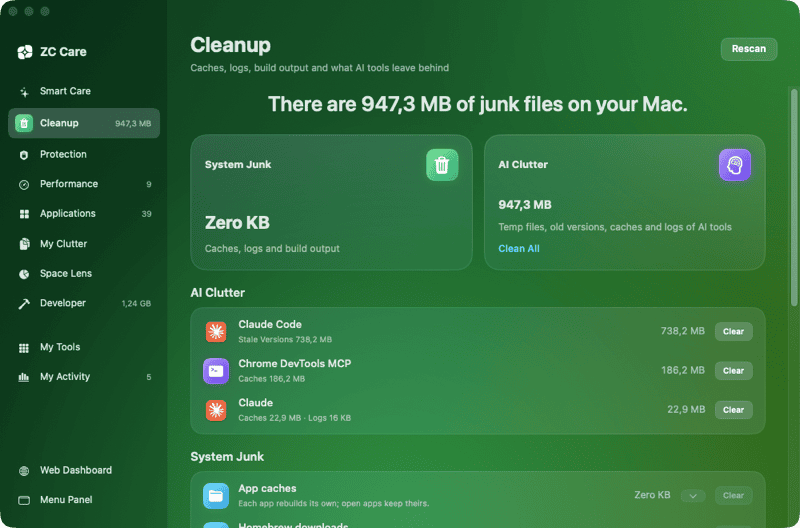
Open ZC Care in the panel opens a window with one module per job. A module opens on an intro that says what it does. Its Scan reads the Mac; nothing changes until you press a module’s clean or remove button and confirm.
| Module | Does |
|---|---|
Smart Care |
Scans everything at once and sums it up in cards: junk, clutter, updates and health. Run cleans up, then updates. |
Cleanup |
Clears caches, logs, build output, npx packages and Mail downloads. Clears AI clutter: Claude Code temp files and old versions, and the caches and logs of Claude, Cursor, ChatGPT, Windsurf, Codex, Gemini CLI and Chrome DevTools MCP. Empties the Trash. |
Protection |
Gatekeeper’s verdict on each app, the apps that run in the background, the privacy permissions apps hold, and each browser’s history, cookies and cache, cleared only while that browser is closed. |
Performance |
Login items, background apps and maintenance tasks: free RAM, flush DNS, thin Time Machine snapshots, reindex Spotlight, and clean Homebrew, Docker and simulators. |
Applications |
Every app with its size and last use. Uninstalls an app with what it keeps in the Library. Adopt replaces an app installed by hand with its Homebrew cask and declares it. Finds what removed apps left behind. |
My Clutter |
Large files, duplicates, similar images, old downloads and installers. Similar images are photos Vision finds alike; the one with the most pixels stays. |
Space Lens |
A map of what fills your home folder. |
Developer |
Dependencies of projects untouched for 90 days, such as |
My Tools |
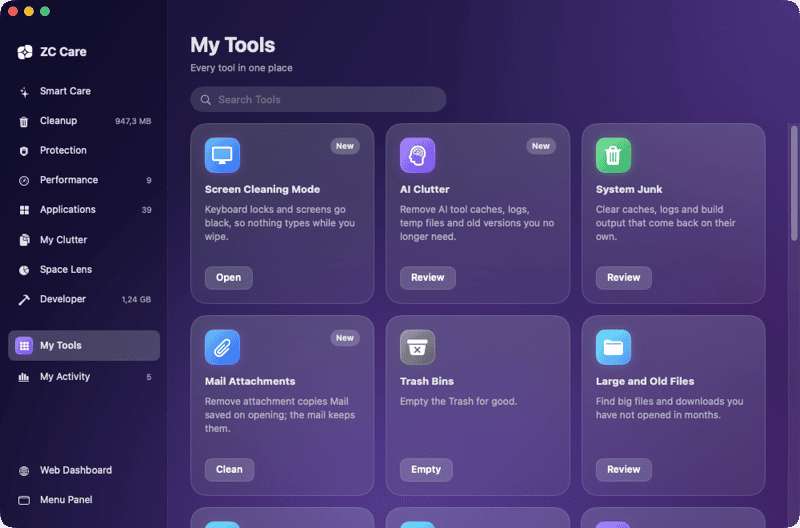
Every tool as a searchable card, including Screen Cleaning Mode, which blacks out the screens and locks the keyboard until you click Done. |
My Activity |
Mac health, disk use, the space ZC Care freed by kind, recommendations from the last scan, and recent activity. |
zcbar://care opens the window, and zcbar://care/<module> opens a module
by the start of its name, such as zcbar://care/cleanup.
zcbar://panel/<tab> opens a panel tab.
What it never touches
-
Chats, settings and sessions of AI tools:
~/.claude/projects,~/.codex/sessionsand the Claude Code version~/.local/bin/clauderuns. -
A Claude Code temp folder used in the last day: a running session owns it.
-
Caches of apps that are open.
Where it goes
Junk, caches and AI clutter are deleted: each tool makes them again. Files,
apps, leftovers, dependencies and models go to the Trash, where you can put
them back. A Homebrew app is uninstalled through zc-workstation remove,
so it also leaves the Brewfile. Maintenance tasks that need an administrator
ask for your password in a macOS dialog.
ZC Care keeps its last scan in ~/Library/Caches/dev.zoolcoder.zcbar and the
activity log in ~/Library/Application Support/dev.zoolcoder.zcbar, outside
the caches it clears.
Develop
$ make app-test      # swift test, the ZCBarCore tests
$ make app           # bin/ZCBar.app
$ make app-icon      # redraw the icons from apps/menubar/icon/mark.svg
ZCBarCore holds the logic, with no UI, and is what the tests cover. ZCBar
is the SwiftUI app over it. CI builds and tests both on a macOS runner.
Edit this page Last updated